
Quick Answer: To log in to access your Myadp Employee Portal, visit https://my.adp.com/, enter your User ID and Password, and click Log In to view your portal.
Once logged in, you can access your pay statements, tax forms, and benefits.
Don’t have an account? Register Here
If you are locked out of your account, you can recover your account using the Forgot / Unlock / Change Password tool.
If you are an employee looking for an easy way to access your benefits, tax information, payroll, or other workplace details online, the MyADP Portal can be a convenient option.
The MyADP Employee Portal allows eligible employees to log in through my.adp.com and manage important employment-related details from one place.
In this article, we will explain the MyADP Employee Portal Login process, including how to access your account, what you can do after logging in, and what steps to take if you have a problem logging in.
Whether you are checking your latest pay statement or reviewing your tax documents, this guide will help you understand the basic MyADP login process.
Let’s check it out…
What is Myadp?
MyADP is an online employee portal designed by ADP (Automatic Data Processing) that gives employees access to important workplace and payroll details. Through the MyADP portal, eligible employees can securely view details such as tax documents, direct deposit information, pay statements, and other employment-related records.
Key Features:
➤ Pay & Taxes
- View Pay Statements: Check current and historical pay stubs, including breakdowns of gross pay, net pay, and deductions.
- Adjust W-4 Information: Update federal and state tax withholding information online.
- Pay Card Access: Monitor balances and transaction histories if using an ADP Aline or Wisely card.
- Access Tax Documents: View, download, and print annual W-2 or 1099 forms.
- Manage Direct Deposit: Set up or update bank account details for direct deposits.
➤ Time & Attendance
- Clock In and Out: Punch in, punch out, or log hours directly via website or mobile.
- Shift Scheduling: View upcoming work schedules, report availability, and swap shifts with coworkers (depending on company setup).
- Manage Timesheets: Create, view, edit, and submit digital timecards for manager approval.
- Time-Off Requests: Review current Paid Time Off balances and submit requests for vacation or sick leave.
➤ Benefits & Retirement
- Open Enrollment: Select, review, and register in medical, dental, and vision insurance plans.
- Retirement & 401(k): Monitor retirement account balances, utilize built-in payroll calculators or planners, and check rates of return.
- Plan Coverage Details: Access current advantages coverage levels, employer contributions, and dependent data.
➤ Profile & HR Tools
- AI Assistance: Interact with ADP Assist, a built-in AI tool that answers employee queries about PTO balances, company policies and tax documents.
- Personal Data Updates: Edit contact details, home addresses, phone numbers, and emergency contacts
Login Requirements
- A device (e.g., mobile phone, Tablet, PC, or Laptop)
- A reliable internet or Wi-Fi connection.
- User’s valid USer ID and Password.
How to Log In to Myadp? – Steps
Follow these simple steps to access your Myadp portal:
➤ Open your browser and visit https://my.adp.com/.
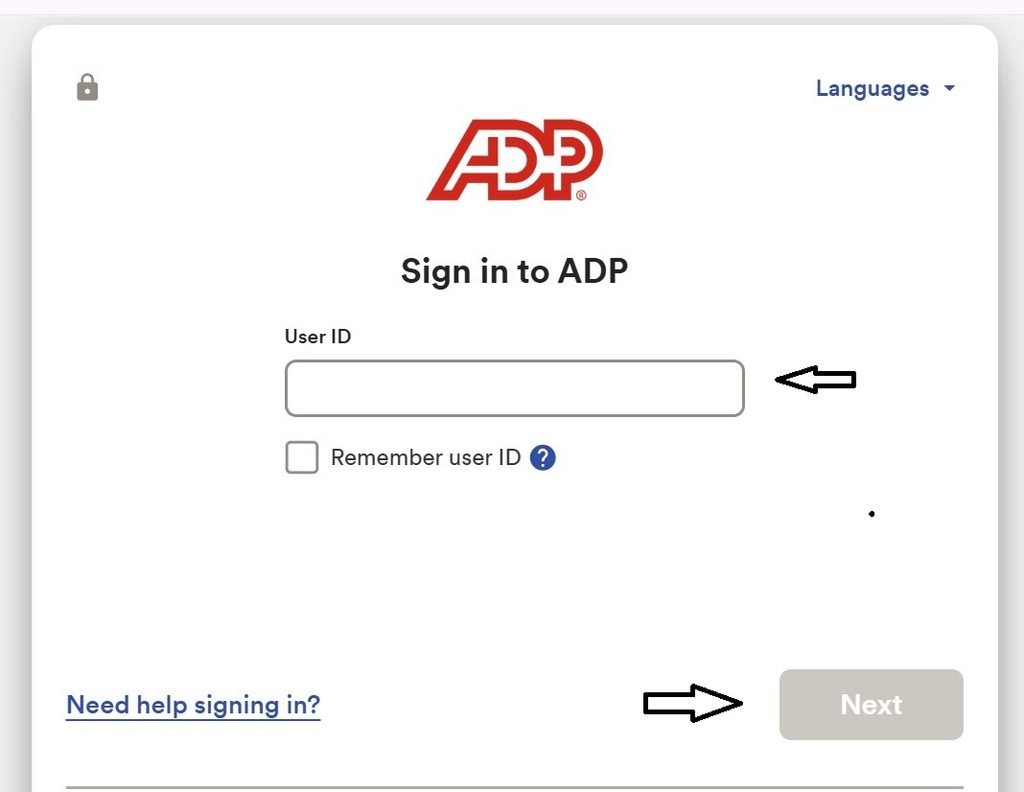
➤ Please enter your User ID and click Next.
➤ Complete any security/verification.
➤ Enter your password Click the “Sign in” button to access your portal.
Activation: To use the Myadp portal, your company must be a client of ADP. Please get your self-service registration code from your company Payroll or HR department. Once you have your registration code, you can register at signin.adp.com.
Forgot Your Password Guide
Follow these simple steps to reset your Myadp portal password:
➤ Open your browser and visit https://my.adp.com/.

➤ Now, Please Click on the “Need help signing in?” Link.

➤ Please enter your User ID, Mobile Number, and Email Address.
➤ Click the “Next” button and follow the instructions to reset your password.
Employee Registration:
Select Register Now to start the registration process. Follow the simple steps to enter your registration code, verify your identity, get your User ID and password, set your security questions, enter your contact details, and enter your activation code. You will then have the ability to review your information and complete the registration process.
General Help & Support
Problems Logging In
If you are having problems logging in to MyADP, try the following:
- Check the spelling and spacing of your password. (Passwords are case-sensitive; remember to turn off the Caps Lock key.)
- You must sign up before you can log into the MyADP application.
- You must use your MyADP user ID and password (not the ID and password you use to sign into your company’s network.
ADP Help Line: You can reach the general ADP employee portal login and help at 844-227-5237.
Official Login Website: https://my.adp.com/.
Final Words
We hope this article has helped you understand the Myadp login process and the main features available through the online portal. If you have any questions about this post, please comment; we will try to help as soon as possible. Thank you…